


Unlocking the Power of SAP Data with Microsoft Fabric — Part 4

In part 3 of this series, we explored various tools and techniques for ingesting SAP data into Fabric/OneLake. You can think of these SAP connection options as being like digital on-ramps, paving the way to a wide range of exciting data-driven possibilities.
Now that the complexities of SAP integration are largely behind us—aside from a few cryptic German table names—we can use Fabric to process this data just like any other relational data source. In this installment, we’ll explore how to process, transform, and prepare your SAP data for analysis using Fabric’s powerful data engineering tools.
Fabric Data Engineering Concepts
Each of the SAP integration options we explored in Part 3 of this series results in your SAP data being loaded in its raw form into a staging area—either OneLake or Azure Data Lake Storage (which we can then integrate into OneLake via shortcuts). While this is an important first step, the real work begins when we transfer this data into the right storage area(s) where it can be unpacked, organized, and made readily accessible for the consumers who need it.
This raises some important questions about how we organize and process this data. For instance, where should we store it? Do we keep it in a data warehouse for structured, high-performance analytics? A data lake for scalable, raw data storage? Or a data lakehouse that combines the strengths of both? Beyond storage, there’s the question of how to move, transform, and enrich this data to ensure it’s clean, accessible, and aligned with business needs. These choices directly impact the performance, usability, and scalability of the overall platform.
Microsoft Fabric addresses these challenges by offering a wide variety of data engineering tools designed to cater to developers of all types. In this section, we’ll take a closer look at these capabilities and provide a high-level illustration of how SAP data can be refined and transformed within Fabric. These are broad topics—each one could easily be the focus of its own blog series—so while we’ll touch on the key points, this overview is meant to give you a sense of what’s possible and how these tools work together to unlock the full potential of your SAP data.
Fabric Storage Options
By separating storage from compute resources (see Figure 1 below), Fabric is able to go beyond basic data lakes to offer several storage options that cater to a wide range of use cases. This includes data warehouses, which are optimized for structured analytics and high-performance querying, and data lakehouses, which combine the scalability of data lakes with the analytical power of data warehouses. This flexibility makes it easy to tailor your data storage strategy to match up with specific storage requirements.

Figure 1: Separation of Compute and Storage Resources in Fabric
Fabric Data Warehouses
If you're coming from an SAP background where you've worked with traditional data warehouse solutions like SAP BW, then you're probably familiar with the basics of data warehousing. However, if you need a refresher, a data warehouse is a centralized, structured data repository that's optimized for reporting and analytics. If we break down this basic definition of a data warehouse, we can draw some important observations:
- Data warehouses are designed to work with structured (tabular) data. In other words, they're great for storing data from SAP database tables, but not so great for analyzing complex graph data encoded in JSON, etc.
- Technically, you can build a data warehouse on any platform that meets the necessary requirements. Indeed, many companies have built their data warehouses on top of relational database management systems (RDBMS) like SQL Server or Oracle because these platforms offer excellent support for cataloging and storing structured data.
- Regardless of where they're deployed, data warehouses do require specialized optimizations on the host database. Traditional RDBMS systems are typically designed for online transaction processing (OLTP), where frequent updates, inserts, and deletes are the norm to support day-to-day operations. In contrast, data warehouses need to be optimized for online analytical processing (OLAP), focusing on efficiently aggregating, summarizing, and querying large volumes of historical data. This allows for fast performance when analyzing trends, generating reports, and supporting complex business intelligence workloads.
In Fabric, the data warehouse repository lives in OneLake using the Delta Lake storage framework. At runtime, Fabric data warehouses utilize massively parallel processing (MPP) to efficiently handle large-scale analytical requests, providing fast insights and seamless integration with tools like Power BI. Figure 2 shows how this works underneath the hood.
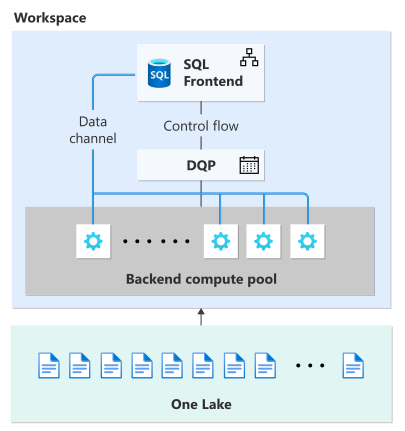
Figure 2: Understanding How Fabric Data Warehouses Work
Of course, the great thing about Fabric is that all of this is abstracted away behind the scenes. So, if you're a data engineer, you can use the Fabric online tools or even your trusty SQL Server Management Studio (SSMS) to quickly create a data warehouse and build dimensional data models (i.e., star schema models) using a combination of familiar graphical tools and Transact-SQL (T-SQL).

Figure 3: Working with Data Warehouses in Fabric
Fabric Data Lakehouses
If you're like Goldilocks and data warehouses are too structured to work with, but data lakes feel like an overwhelming free-for-all, then data lakehouses offer that "just right" balance you may be looking for. Data lakehouses blend the best of both worlds, combining the robust performance and governance features of data warehouses with the scalability and flexibility of data lakes. Together, these features enable seamless handling of both structured and unstructured data, simplifying analytics and supporting AI/ML workloads—all while eliminating the challenges of siloed systems and messy data sprawl.
As you can see in Figure 4, lakehouses in Fabric look an awful lot like data warehouses. However, there are a few additional features/restrictions to note here:
- As you can see in the left-hand side of the figure, data within a lakehouse is split between structured (Delta Lake) tables and raw files. This allows us to store structured and unstructured data all in one place.
- Although lakehouses do provide a SQL endpoint, you're limited to read-only access. To build or load data into the lakehouse, you'll work with tools like (Python) notebooks, Data Factory, or Apache Spark.
- Performance-wise, data lakehouses are generally not as fast as data warehouses.

Figure 4: Working with Data Lakehouses in Microsoft Fabric
Building on the Medallion Architecture
Now that you understand the different storage options supported by Fabric, you might be wondering where to begin when it comes to transforming all that raw SAP data sitting out on the loading dock in data lake storage. This is where proven data engineering techniques like the Medallion Architecture comes into play.
As you can see in Figure 5 below, the Medallion Architecture provides a clear path for organizing and refining your SAP data into actionable insights:
- Bronze Layer: At this layer, we load all the SAP table data in its raw state into one or more data lakehouses. Whether you choose to load the data into one large lakehouse or several purpose-built lakehouses is mostly a matter of preference. From a data integrity perspective, this layer acts as a historical record and sets the stage for downstream processing.
- Silver Layer: At this layer, we clean up, transform, and enrich the raw SAP data to drive consistency and make the data more accessible.
- Gold Layer: This layer optimizes, aggregates, and refines the data into high-level datasets that are tailored for business intelligence (BI), data science, and other data-related use cases.

Figure 5: Curating SAP Data Models Using the Medallion Architecture
Working from left-to-right, you can see that the Medallion Architecture enables us to carefully refine SAP data in structured and repeatable way. This approach makes it easy to trace data lineage and even build sophisticated consistency checks in tools like Microsoft Purview.

Figure 6: Tracing Data Lineage with Fabric and Microsoft Purview
In the upcoming sections, we'll explore some of the tools that you can use to develop your own Medallion Architectures within Fabric.
Working with Data Factory
Data Factory in Microsoft Fabric builds on the foundation of Azure Data Factory (ADF)—Microsoft’s go-to PaaS solution for data integration. While ADF has long been a go-to tool for orchestrating ETL/ELT processes across cloud and on-premises systems, Data Factory in Fabric takes things a step further by embedding these capabilities directly into Fabric and introducing a number of new low-code development features.
With Data Factory, data integration development starts with pipelines. Pipelines serve as the backbone for orchestrating ETL/ELT workflows, enabling seamless data movement and transformation across various sources. With built-in scheduling, error handling, and integration with Dataflows Gen2, pipelines ensure data is processed efficiently and reliably. Check out the video below to see pipelines in action.
While pipelines handle orchestration, dataflows can take on much of the heavy lifting for ETL jobs, enabling efficient data transformation and processing. With Dataflows Gen2, we can simplify complex data transformations even further using a low-code/no-code approach based on Power Query. These new features enable you to significantly reduce development time while still providing the scalability and power of traditional ADF pipelines. Check out the video below to learn how these new dataflows work in Data Factory.
Working with Spark / Notebooks
If your team prefers to work in a pro-code environment using notebooks and Apache Spark, Fabric also provides a powerful, flexible workspace for performing complex data engineering tasks. With OneLake as the unified storage layer, Spark developers can seamlessly access and process structured and unstructured data without the need for extensive data movement or duplication.
Fabric’s notebook-based development environment supports Python, Scala, and SQL, allowing engineers to work with their preferred languages while leveraging open-source libraries like PySpark, Delta Lake, MLflow, and Pandas to build scalable ETL pipelines, AI models, and advanced analytics solutions.

Figure 7: Working with Notebooks in Fabric
Behind the scenes, Fabric takes care of provisioning the Spark runtime environment while making it easy to scale to support efficient execution of complex transformations across massive datasets. Notebooks also integrate directly with Git repositories (e.g., Azure DevOps or GitHub), ensuring proper version control, collaboration, and CI/CD workflows. This makes Fabric an ideal choice for teams that want to maintain full control over their data engineering processes while benefiting from a cloud-native, scalable environment.
If you're not familiar with Spark and/or Python, it's worth noting that Microsoft continues to lower the barrier to entry for novice data engineers through low-code and AI-powered assistants. For example, the built-in Data Wrangler tool shown in Figure 8 provides an intuitive interface for exploring and transforming data, generating PySpark code that can be further customized by developers. Additionally, Copilot in Fabric assists with writing Spark queries, optimizing performance, and even debugging issues, making it easier for new users to ramp up quickly.

Figure 8: Working with the Data Wrangler Tool
Closing Thoughts
Hopefully, this deep dive into Fabric’s data engineering tools has helped you get a handle on how Fabric can help you build SAP data models that actually work for the business. With its seamless data integration, built-in transformation capabilities, and scalable compute power, Fabric provides some serious tailwind—making it faster and easier than ever to develop models at an unprecedented scale.
But building data models is just the beginning. In our next (and final) installment, we’ll shift gears and put these models to work—showing you how to analyze and visualize SAP data using Power BI, Fabric Data Science, and Real-Time Intelligence. Get ready to see how these tools can transform raw data into game-changing insights that drive smarter, faster decisions across your organization. You won’t want to miss it—stay tuned!