


Unlocking the Power of SAP Data with Microsoft Fabric — Part 5

So far in this series, we’ve explored how Microsoft Fabric unifies data, simplifies integration, and enhances analytics for SAP customers. In this final installment, we’ll shift our focus by exploring some of the most compelling ways Fabric can help you put your SAP data to work in new and exciting ways.
From AI-driven insights to seamless Power BI integration, Fabric unlocks powerful capabilities that go way beyond traditional reporting—helping you uncover trends, automate workflows, and make smarter decisions faster. So, let’s dive into what’s possible when you harness the full potential of your SAP data within Fabric.
Data Visualization with Power BI
As we noted in Part 2 of this series, Power BI is the go-to data visualization tool within Fabric, playing a similar role to familiar SAP visualization tools such as SAC or BusinessObjects. In recent years, Power BI has really distanced itself as the industry leader in BI visualization. In fact, Microsoft asserts that Power BI is used by over 95% of Fortune 500 companies.
Accolades aside, Power BI has deservedly earned a reputation for its ease of use and powerful self-service capabilities. Its intuitive interface and extensive support for business analysts make it an ideal choice for organizations looking to democratize data access and empower users at all levels.

Figure 1: Sample Power BI Dashboard with Live Data From SAP
With its deep integration into Microsoft Fabric, Power BI enables seamless connectivity to SAP and other enterprise systems, allowing teams to transform raw data into actionable insights and tell stories with data through interactive dashboards and reports.
Since Power BI is such a vast topic deserving of its own blog series, we'll narrow our focus in this section to SAP integration and some of the most compelling AI-driven features that help users extract deeper insights.
Better Together: SAP + Fabric + Power BI
In a recent blog post, Microsoft Power Platform and SAP Connectivity 101, we reviewed the built-in SAP connectors used to integrate SAP data into Power BI. Prior to Fabric, there were three basic techniques used to integrate SAP data into Power BI reports and dashboards:
- Import Mode: Perhaps the most common technique involved using one of the built-in SAP connectors to import the data into a semantic model (Import storage mode) and then periodically refresh it on say a nightly basis.
- DirectQuery Mode: In some situations - especially if the SAP data was available in SAP HANA - the SAP data would be integrated via DirectQuery storage mode. Here, data requests (i.e., queries) are redirected to the SAP backend system in real-time.
- Via a Data Warehouse: The third approach was a hybrid of 1 & 2, with the SAP data staged in an intermediate data warehouse (e.g., Synapse, Snowflake, or Google BigQuery) before being loaded into the semantic model in either Import or DirectQuery storage mode.
Although all three of these techniques work reasonably well, there are some drawbacks. For example, the Import storage mode struggles with large SAP datasets due to size limitations. Plus, keeping data fresh requires delta refreshes, which can be complex and slow—especially when dealing with massive transaction tables.
DirectQuery storage mode unlocks real-time access to SAP data—but at the cost of performance. Reports running in DirectQuery mode often feel sluggish, especially when users are drilling into large datasets or running complex queries.
With Fabric, we have a new storage mode for semantic models: the so-called Direct Lake storage mode. Instead of pulling data row by row like DirectQuery or loading it in chunks like Import mode, Direct Lake mode loads SAP data straight from Delta Lake tables into memory using Power BI’s VertiPaq engine. This means dashboards and reports run at near-Import mode speeds without the need for full refreshes.
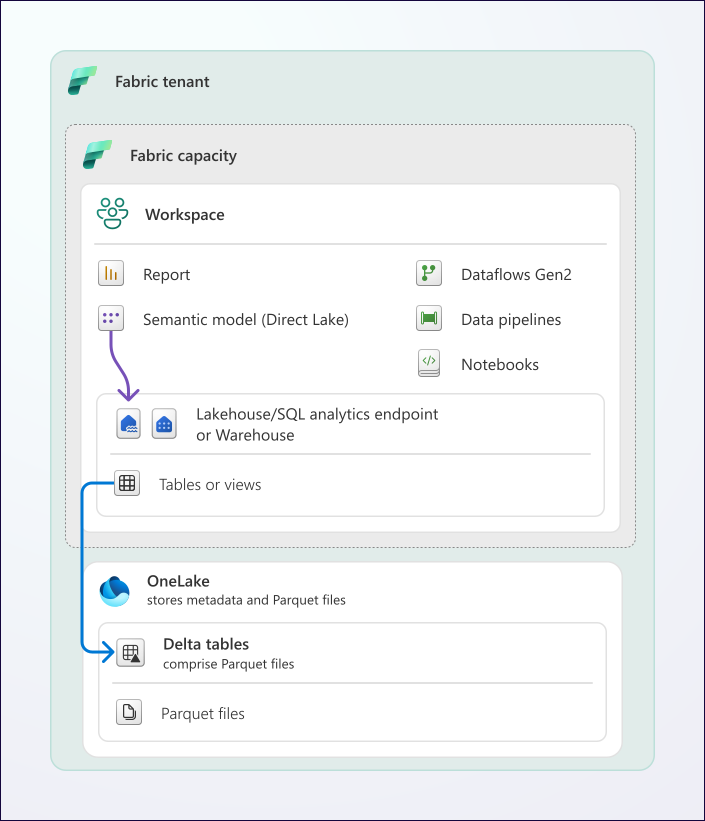
Figure 2: Understanding Direct Lake Mode with Power BI & Fabric
By leveraging Delta Lake’s open format and VertiPaq’s high-performance compression, Direct Lake mode makes it possible to work with massive SAP datasets while still keeping data up to date. Reports that used to crawl in DirectQuery mode now feel instantaneous, and you get near-real-time insights without the hassle of managing complex refresh cycles.
Next-Level Features
Although Power BI is great at building traditional dashboards and 2D reports, that's really just the tip of the iceberg. In recent years, Microsoft has invested heavily to incorporate some AI-powered features that can help you analyze your SAP data in new and exciting ways:
- Copilot in Power BI – With Microsoft Copilot, you can simplify the report development process by asking Copilot to help you analyze data to uncover insights, create/bind visuals, and build reports simply by describing what you need in natural language. For business users in particular, this is a powerful new tool that significantly lowers the barrier to entry.
- AI-Generated Insights – Power BI’s AI capabilities can be used to automatically detect trends, outliers, and key influencers in data, helping you uncover patterns in data you might have otherwise missed. The Key Influencers visual, for example, identifies factors driving specific outcomes, providing a more intuitive approach to data analysis.
- Natural Language Querying (Q&A) – With the Q&A feature, you can ask questions about your data in plain English (or other languages) and receive instant, interactive visual responses. This feature empowers your business users to explore data without needing deep technical expertise (e.g., SQL).
- Automated Anomaly Detection – Power BI can automatically scan data for anomalies and alert users when unexpected trends or deviations occur.
- Smart Narrative & Automated Summarization – Power BI can generate written summaries of dashboards and reports using AI, providing context and insights alongside visual data. This feature helps non-technical users quickly understand key takeaways without manually interpreting complex charts.
The great thing about all these AI-powered features is that they're generally of the "just add data" variety. So, once you load your SAP data into Fabric and connect it to Power BI, you can begin incorporating these features to tell even more compelling stories with your SAP data.
Pre-Packaged Content
To help you jumpstart your analytics journey, Microsoft offers its Enterprise Insights accelerators—pre-packaged solutions that take the heavy lifting out of building reports and dashboards. These accelerators come with ready-to-use SAP data models, report templates, and AI-powered analytics tailored for common business scenarios, so you can start gaining insights from your SAP data faster.
Data Science with Fabric
For data scientists, Fabric is an awesome place to work. It offers a seamless, enterprise-grade environment to build predictive models, run machine learning experiments, and uncover hidden patterns in your SAP data—all without the usual headaches of spinning up infrastructure resources like Apache Spark or Databricks. With built-in support for Azure Machine Learning, PySpark, and AutoML, Fabric makes it super easy to jump right in and get started.
One of the standout features for data scientists is Fabric’s integrated web-based Notebook authoring experience (see Figure 3 below). With just a few clicks, you can spin up a Notebook and start working with PySpark (Python), Spark (Scala), Spark SQL, and SparkR—all within a unified environment. There’s no need to worry about infrastructure configuration—Fabric automatically manages Spark pools, scaling them as needed, so you can focus on building models instead of configuring Spark clusters.

Figure 3: Working with the Fabric Notebook Authoring Experience
Fabric also makes it incredibly easy to configure Spark environments with popular open-source Python data science libraries like Pandas, Scikit-learn, Matplotlib, and TensorFlow. Above and beyond what's included out of the box, Fabric gives you the flexibility to bring in the tools and libraries you need. By combining the power of Spark with Fabric’s seamless integration into Microsoft’s broader AI and analytics ecosystem, you get an enterprise-grade data science platform that simplifies complex workflows while unlocking powerful new insights from your SAP data.

Figure 4: End-to-End Process Flow with Fabric Data Science
To see how this works in practice, check out the video below which walks you through an end-to-end data science scenario.
Bringing AI to Life: Harnessing Fabric and Azure AI
With Fabric Data Science, you're not just limited to working with Notebooks and open-source libraries—you also have direct and seamless access to Azure AI services (now known as Azure AI Foundry), a full ecosystem of AI tools that make it easier to build, train, and scale AI models. This unlocks some very powerful use cases:
- Document Information Extraction: With Azure AI Document Intelligence, you can analyze and extract data from attachment files.
- Image Analysis: With Azure AI Vision, you can analyze images and extract text (e.g., from scanned documents).
- Text Analysis: With Azure natural language processing (NLP), you can process large amounts of text data, detect sentiment or generate summaries with Generative AI.
- Language Translation: With Azure language translation services, you can easily translate large amounts of text between different languages - a very powerful feature for SAP customers that run global instances.
- Anomaly Detection: With services like the Azure AI Anomaly Detector, you can monitor and analyze operational data to flag unusual trends before they become bigger problems.
These are just a few examples of the kinds of AI models you can develop with Fabric and Azure AI Foundry. Something notable here is that while some of these AI models are highly complex, most of the Azure AI services provide simplified SDKs or APIs that make them highly accessible even if you don't happen to have a PhD in Computer Science. There are also low-code options such as Azure Machine Learning Studio where you can build, train, and deploy AI models without writing extensive code.
Fabric also integrates with Azure OpenAI Services, giving you access to the latest and greatest generative AI models like GPT-4. Whether you're wanting to automate content creation, generate insights from unstructured data, or reason through SAP-based transaction logs, Azure OpenAI makes it surprisingly easy to bring these capabilities into your workflows.
For a deep dive overview into how Fabric integrates with Azure AI Foundry, check out the video below.
Real-Time Intelligence
As we've seen throughout this series, Fabric and OneLake remove a lot of the inertia and latency typically associated with SAP data integration. Instead of relying on slow, complex ETL processes or waiting for batch jobs, Fabric simply provides more immediate access to SAP data. With OneLake serving as a unified storage layer, it's relatively easy to develop Medallion Architectures that reduce the time it takes to make SAP data available for analysis.
Microsoft Fabric’s real-time intelligence capabilities build on this by allowing you to capture, process, and analyze data as it happens. Whether you’re monitoring SAP transactions, tracking IoT device data, or detecting anomalies in operational workflows, Fabric provides tools to incorporate live data into decision-making.
Basic Concepts
Fabric’s real-time intelligence capabilities are built on several core components that work together to ingest, process, analyze, and act on live data streams. Here’s a quick breakdown of the key elements (refer to Figure 5 for context):
- Eventstreams – A scalable data pipeline that ingests and routes streaming data from sources like SAP transaction events, IoT sensors, and business applications, ensuring real-time availability.
- Eventhouses – A specialized storage layer optimized for high-speed, high-volume event data, allowing for efficient querying and historical analysis.
- KQL Querysets – These querysets enable fast, interactive querying of streaming data using Kusto Query Language (KQL), making it easy to extract insights from real-time and historical data.
- Activators – Trigger-based automation tools that respond to real-time data conditions, allowing for alerts, workflows, and automated actions.
- Reflexes – AI-driven capabilities that detect patterns and anomalies in real-time streams, enabling proactive decision-making and automated responses.
- Real-Time Hub – A centralized interface for managing real-time data sources, pipelines, and insights, simplifying the monitoring and administration of streaming workloads.
- Real-Time Dashboards – Interactive Power BI visualizations that update in real time, providing an up-to-the-moment view of key metrics and operational data.

Figure 5: Fabric Real-Time Intelligence Overview
Collectively, these features enable you to create a digital nervous system for your business. This allows you to not only monitor business processes and detect anomalies but also develop intelligent workflows that make your business smarter and more efficient.
Practical Use Cases
Customers that are new to Real-Time Intelligence often assume that it's primarily used for processing IoT data streams, but its capabilities go far beyond that. Fabric’s ability to ingest data from SQL databases also makes it possible to stream SAP transaction events in real time, opening up new possibilities for business process automation and operational visibility.
This means you can capture and react to SAP transaction events as they happen. Whether it’s a status update on a work order, a warehouse task, or a customer order fulfillment, these changes can be streamed through Fabric’s Real-Time Intelligence framework. From there, real-time dashboards like the one shown in Figure 6 provide instant visibility to key business process flows.

Figure 6: Real-Time Dashboard Experience in Power BI
Automation tools like Activators and Reflexes take this to a whole new level by enabling you to trigger workflows, alerts, or even process AI-driven recommendations in near real time to improve responsiveness and decision-making across supply chain, finance, customer service, and other core SAP process flows. To see how this works, check out the video below.
Outlook: Fabric as a Platform for Innovation
Throughout this series, we've seen that Microsoft Fabric is so much more than just another data tool—it’s a unified platform that can bring SAP and non-SAP data together in one place, making analytics, AI, and automation more accessible. With OneLake serving as a centralized data foundation, Fabric removes the traditional barriers of working with fragmented data estates, providing a streamlined and simplified way to access, analyze, and act on data across the enterprise. And, if you're leveraging SAP, this means seamless integration with the rest of the business, enabling a “better together” approach where SAP data is no longer siloed but fully connected to the broader Microsoft ecosystem.
As we noted in our recent article 10 Reasons Your Business Needs Microsoft Fabric, one of Fabric’s greatest strengths is that it supports a wide range of user personas, from technical experts to business professionals. Data architects and engineers can design scalable, governed data solutions using Fabric’s powerful storage, transformation, and orchestration tools. Data scientists and analysts need more than just access to data—they need a dedicated space to analyze, experiment, and innovate without fear of disrupting production systems. Fabric provides a secure, governed lab environment where teams can stage data cleanup efforts, run simulations, test hypotheses, and model different business scenarios before applying them in a live setting. This makes it easier to refine datasets, ensure accuracy, and explore new ways to leverage SAP data for better decision-making.

Figure 7: Overview of the Fabric Ecosystem
Beyond data cleanup and simulations, Fabric’s integrated AI and analytics tools also open the door for data experimentation. Fabric integrates seamlessly with Microsoft Purview, providing robust data governance and compliance capabilities. Together, Fabric and Purview strictly enforce data policies, ensuring that users operate within a controlled, “on rails” environment where they can safely experiment with data without compromising security or regulatory requirements.
Beyond governance, Fabric works in concert with other Microsoft Cloud services like Azure AI, Azure Synapse, and Power Platform, ensuring that organizations can scale analytics, AI, and automation initiatives securely and efficiently. By combining SAP data with the full power of the Microsoft ecosystem, Fabric delivers a flexible, future-ready platform for innovation—one that empowers users across the business while maintaining control, security, and governance at every level.
Closing Thoughts
We’ve covered a lot of ground in this series, but if there’s one big takeaway, it’s this—Microsoft Fabric makes working with SAP data easier, smarter, and more powerful than ever. By bringing everything together under one roof in OneLake, Fabric breaks down silos and gives you seamless access to your data, whether you’re building real-time dashboards, running AI-powered analysis, or experimenting with machine learning.
Although we talk about this concept ad nauseam in this space, what really sets Fabric apart is its “better together” approach. While there are plenty of data platforms out there that you can use to integrate your SAP data—Fabric's unique all-in-one approach enables you to do so much more with your data by enabling seamless integration with tools like Azure AI Foundry and the Power Platform. Plus, with deep integration with Microsoft Purview, you can rest assured that your data is secure, well-governed, and accessible to the right people. Whether you’re a data engineer, a business analyst, or somewhere in between, Fabric simply makes your job easier.
The future of data-driven decision-making is here, and Fabric is built to help you take full advantage of it. If you’re ready to rethink how you use SAP data, now’s the perfect time to explore how Fabric can help you turn insights into action and unlock new possibilities for your business.